


Field Service Call Center Software with One-Click Dispatch
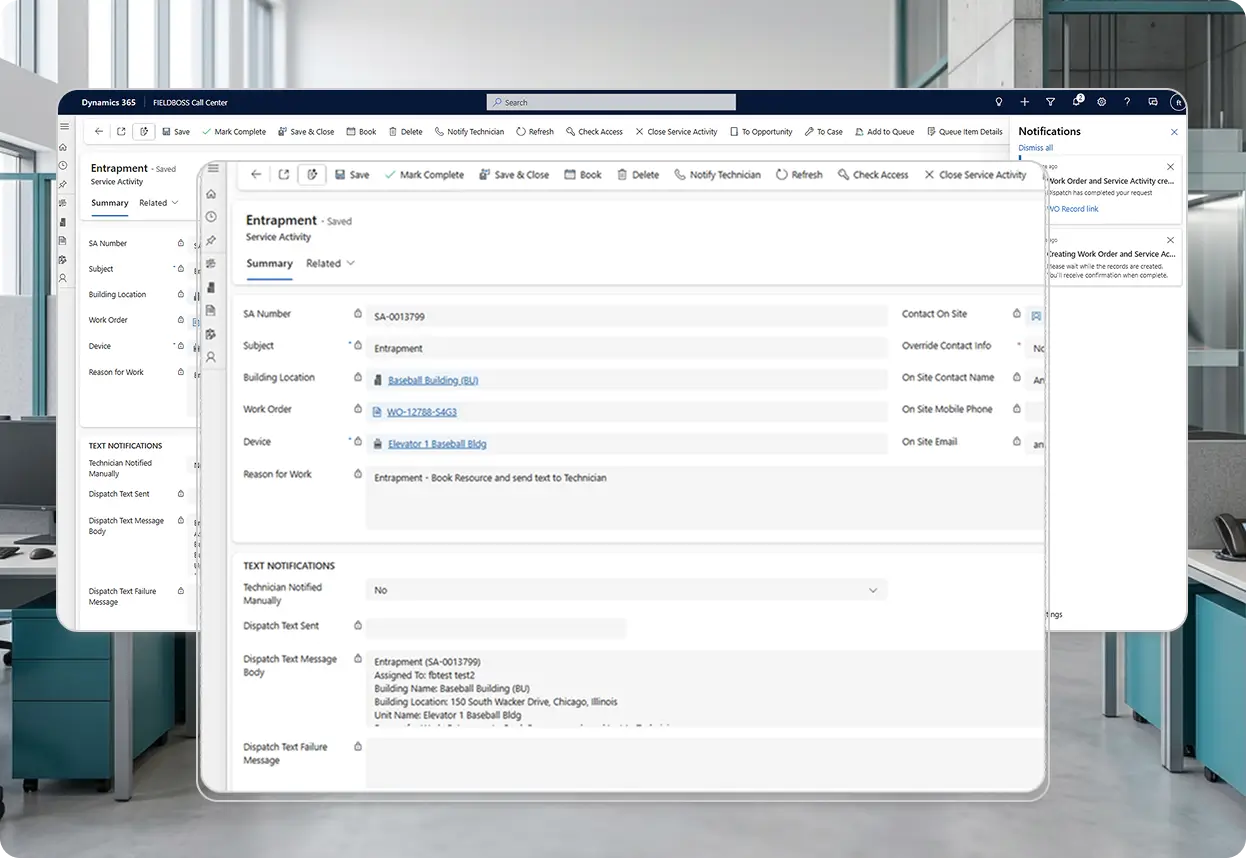
The FIELDBOSS Call Center App is a streamlined dispatch application built on Microsoft Dynamics 365 for call center agents and after-hours answering services that lets agents search building locations, create work orders, and dispatch technicians to service calls without needing access to the full FIELDBOSS system.






























How Does the FIELDBOSS Call Center App Manage Service Call Dispatch?
The Call Center App gives agents a simplified, purpose-built interface for taking a call and dispatching a technician in one pass, without needing full FIELDBOSS access. It’s a separate, lightweight app that syncs with the core FIELDBOSS system, so agents get exactly what dispatch requires rather than the entire platform behind a complex set of permissions.
Create and Dispatch Without Leaving the Call
Call Center agents create Work Orders and Service Activities directly from the app while they’re still on the phone with the customer, capturing key service-request details without multiple steps or screens.
That means the call is documented and ready for dispatch immediately, rather than written down and entered into the system later. Agents work from a fast, focused screen built just for dispatch, not the full FIELDBOSS interface.
- Work Orders and Service Activities created directly from the Call Center app
- Key service-request details captured while still on the call
- No separate step to re-enter details after the call ends
- Purpose-built interface, not the full FIELDBOSS platform
Assign, Reassign, and Change Technicians in One Screen
Agents can assign and dispatch calls to technicians, or add and change technicians on a call, without leaving the Call Center screen.
A scheduling canvas app built into Call Center supports reassigning or adjusting Service Activity resources, including scheduling multiple resources to a single call, using a modern scheduling experience rather than the full Schedule Board.
- Calls assigned and dispatched to technicians from a single screen
- Technicians added or changed on a call without leaving the app
- Scheduling canvas support for multiple resources on one Service Activity
- No need to open the full Schedule Board for routine reassignment
See Account Status Before You Dispatch
FIELDBOSS shows a building location’s Credit Hold and Dispatch Hold status directly inside the Call Center app, before a technician is sent.
A Dispatch Hold flags a location so technicians aren’t automatically sent out, for example due to non-payment or a site access issue, while specific services can be configured to override the hold for emergencies. That visibility cuts down on avoidable trips and awkward conversations in the field.
- Credit Hold and Dispatch Hold status visible before dispatching
- Dispatch Holds flagging non-payment or site access issues
- Emergency services configurable to override a hold
- Fewer avoidable truck rolls to accounts that shouldn’t be dispatched
Avoid Sending a Second Truck for the Same Issue
The Call Center app surfaces recent service activity for a building location before a new call is created.
Agents can also view previous Work Orders to understand a customer’s service history, though full customer account details live in the core FIELDBOSS system instead, keeping the Call Center screen fast and focused on dispatch.
- Recent service history for a building visible before creating a new call
- Fewer duplicate truck rolls for the same reported issue
- Previous Work Orders visible to agents for service context
Keep Technicians Updated in Real Time
Agents can text an assigned technician’s dispatch details directly from the Call Center app.
When a resource changes mid-call, agents can retrigger the SMS immediately, so the technician has current information without a follow-up phone call from the office.
- SMS dispatch details sent or resent from the Call Center app
- Automatic resend whenever the assigned technician changes mid-call
- Technicians kept current without a separate follow-up call
Call Center Dispatch Built for Your Trade
Every trade dispatches a call differently. FIELDBOSS’s Call Center App is built around how each one takes a call and gets a technician moving.
Get an elevator entrapment call to a technician immediately, without waiting for a scheduler to become available. FIELDBOSS’s Call Center App lets any trained agent search the building location and dispatch the closest available technician in one pass, so trapped-passenger calls never sit in a queue.
Handle emergency no-heat and no-cool calls even when volume spikes with the weather. FIELDBOSS’s Call Center App keeps emergency dispatch to one call, so a truck is moving before the customer finishes describing the problem.
Route calls for fire protection, mechanical, or other specialty trades through the same dispatch screen as elevator or HVAC work. FIELDBOSS’s Call Center App works the same way across every service type, so agents don’t need separate training or systems per trade.
FIELDBOSS has allowed us to better allocate our resources; to make more efficient use of the resources we have. Operating on gut feelings has been replaced with monitoring work activity in near real-time.
Explore Related Features


Works With Your Existing Tools
Frequently Asked Question
Yes. Call Center users can view previous Work Orders to see a customer’s service history, though they don’t have access to full customer account details from within the app.
Yes. When dispatching, agents can identify the building location and select the applicable device or equipment, so the technician knows exactly what they’re being sent to service.
Yes. Agents can create a Work Order in real time and capture the key details of the service request without multiple steps or screens, so the call is documented and ready for dispatch immediately.
No. Pricing, payment terms, and tax information can default from the customer or account setup, so agents can focus on capturing the service issue rather than entering financial details manually.
Yes, if SMS messaging is configured. Agents can send or resend a text notification to the assigned technician with their dispatch details.
Ready to Speed Up Dispatch?
See how the Call Center app gets a technician assigned before the customer hangs up: a focused walkthrough of the actual agent screen.

What Is Field Service Call Center Software?
Field service call center software — sometimes used as after-hours answering service software when no one’s in the office — gives call center agents a fast, simplified way to log an incoming service request and dispatch a technician, without needing access to the company’s full field service platform. FIELDBOSS’s Call Center App syncs with the main FIELDBOSS system on Microsoft Dynamics 365, so every dispatched call flows into the same connected record as scheduling and billing. Agents can create and dispatch calls, but can’t edit existing Work Orders, reschedule Service Activities, or access reports and invoicing.
What is a Dispatch Hold?
A Dispatch Hold flags a building location so technicians aren’t automatically sent out, for example due to non-payment or a site access issue. Specific services can be configured to override the hold for emergencies, and Call Center agents can see hold status before dispatching.